n8n Content Automation: Build an AI Content Pipeline in 2026
Last Updated: March 2026 · By Daniel Vengoechea, AI Systems Builder & Founder of GetTranscribe.ai
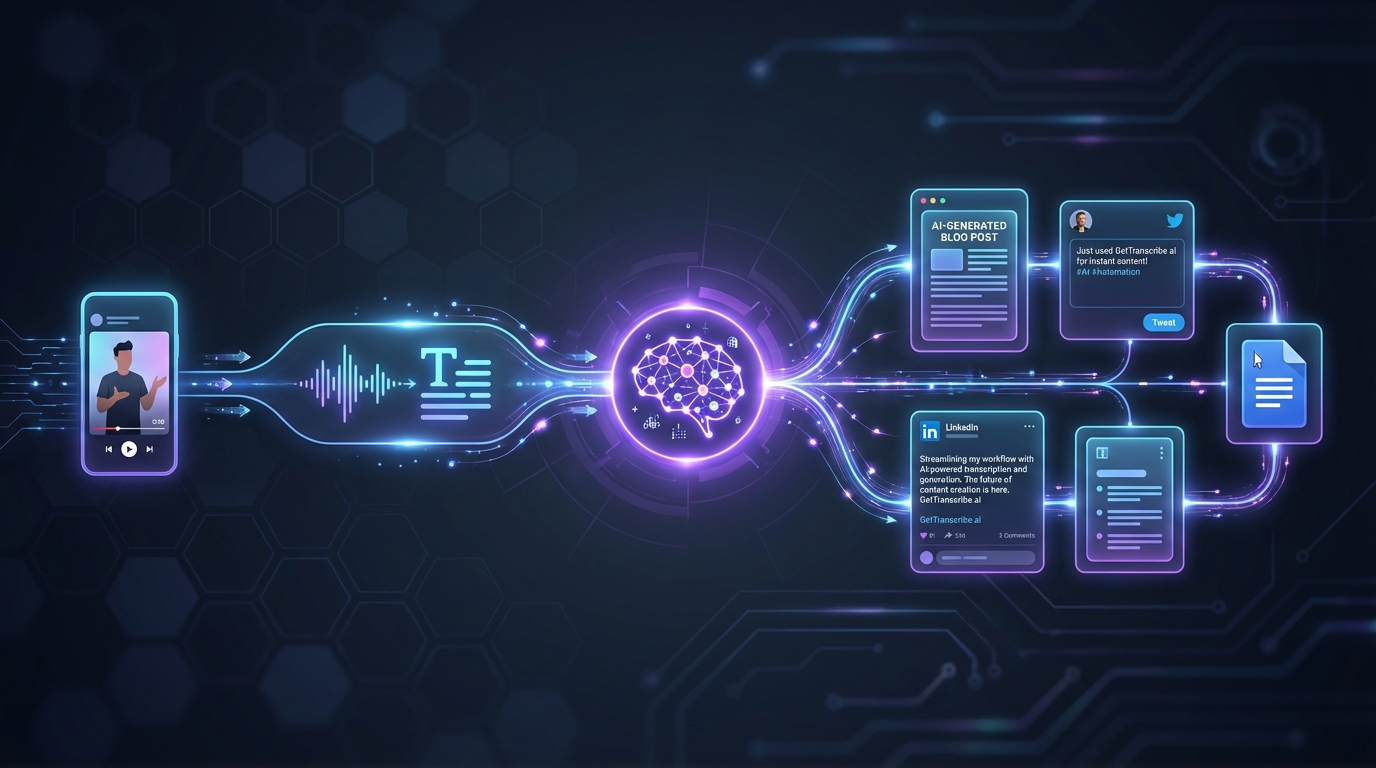
TL;DR — What You'll Learn
- How to build a fully automated content generation pipeline using n8n + GetTranscribe.ai — from social video URL to published content — in under 60 minutes.
- Five ready-to-use n8n workflow templates for content creators, agencies, and marketers that run 24/7 without human intervention.
- The exact cost breakdown: a complete pipeline processing 100 videos/month costs approximately $25–40/month total.
Content creators, agencies, and marketers in 2026 face the same brutal bottleneck: there's too much valuable video content being published every day on Instagram, TikTok, and YouTube, and not enough time to extract insights, repurpose it, or turn it into written assets. The manual approach — watching videos, typing notes, pasting into ChatGPT, formatting outputs — devours hours that could be spent on strategy and creative work.
That's exactly the problem n8n content automation solves. And when you combine n8n's open-source workflow power with GetTranscribe.ai's native video transcription node, you get something remarkably powerful: a self-running content machine that monitors social media, transcribes videos automatically, feeds transcripts to AI for analysis, and publishes finished content — all without you lifting a finger after the initial setup.
GetTranscribe.ai is the only social media video transcription tool with an official node listed on the n8n marketplace, supporting 7 platforms — Instagram, TikTok, YouTube, Facebook, Pinterest, Twitter/X, and Google Drive — from a single URL paste.
A fully automated content generation pipeline built on n8n and GetTranscribe.ai can process 100 social media videos per month — transcribing, AI-analyzing, and publishing — for approximately $25–40 total cost, running 24/7 without human intervention after initial setup.
In this guide, you'll learn how to build this pipeline step by step, explore five real workflow templates, and discover the 2026 SEO best practices that make AI-generated content actually rank.
What Is n8n Content Automation?
In 2026, n8n content automation refers to using n8n's open-source workflow platform to build fully automated pipelines that monitor, process, analyze, and publish content — replacing dozens of manual steps with a self-running system.
n8n (pronounced "n-eight-n") is a fair-code workflow automation platform with 400+ integrations and over 50,000 active users worldwide. Unlike closed platforms like Zapier, n8n can be self-hosted, giving teams full control over their data and workflows. For content teams, this means building complex multi-step pipelines that connect video sources, transcription services, AI models, and publishing destinations — all in a visual, no-code interface.
The critical piece that makes content automation possible is transcription. Video content — which dominates social media in 2026 — is locked in an audio format that AI models can't directly process. You need a reliable bridge between video and text. That's where GetTranscribe.ai's n8n node comes in: it takes any social media video URL and returns a structured JSON transcript with word-level timestamps, ready for any downstream AI processing.
Why Content Creators and Agencies Are Automating in 2026
The content landscape in 2026 has fundamentally shifted. Three forces are driving the automation imperative:
- Volume overload: Over 500 million short-form videos are uploaded daily across TikTok, Instagram Reels, and YouTube Shorts. No human team can manually monitor, transcribe, and analyze even a fraction of the content relevant to their niche.
- AI-native workflows: With LLMs like GPT-4, Claude, and Gemini now capable of sophisticated content analysis, the bottleneck is no longer "Can AI write well?" — it's "How do I get content into and out of AI systems automatically?"
- Economic pressure: Agencies managing 10+ client accounts need to produce more content with the same team size. Automation isn't a luxury — it's a survival strategy.
Using n8n's official GetTranscribe node, a workflow that once required 4+ hours of developer setup to build with DIY tools can be configured in under 5 minutes with no code.
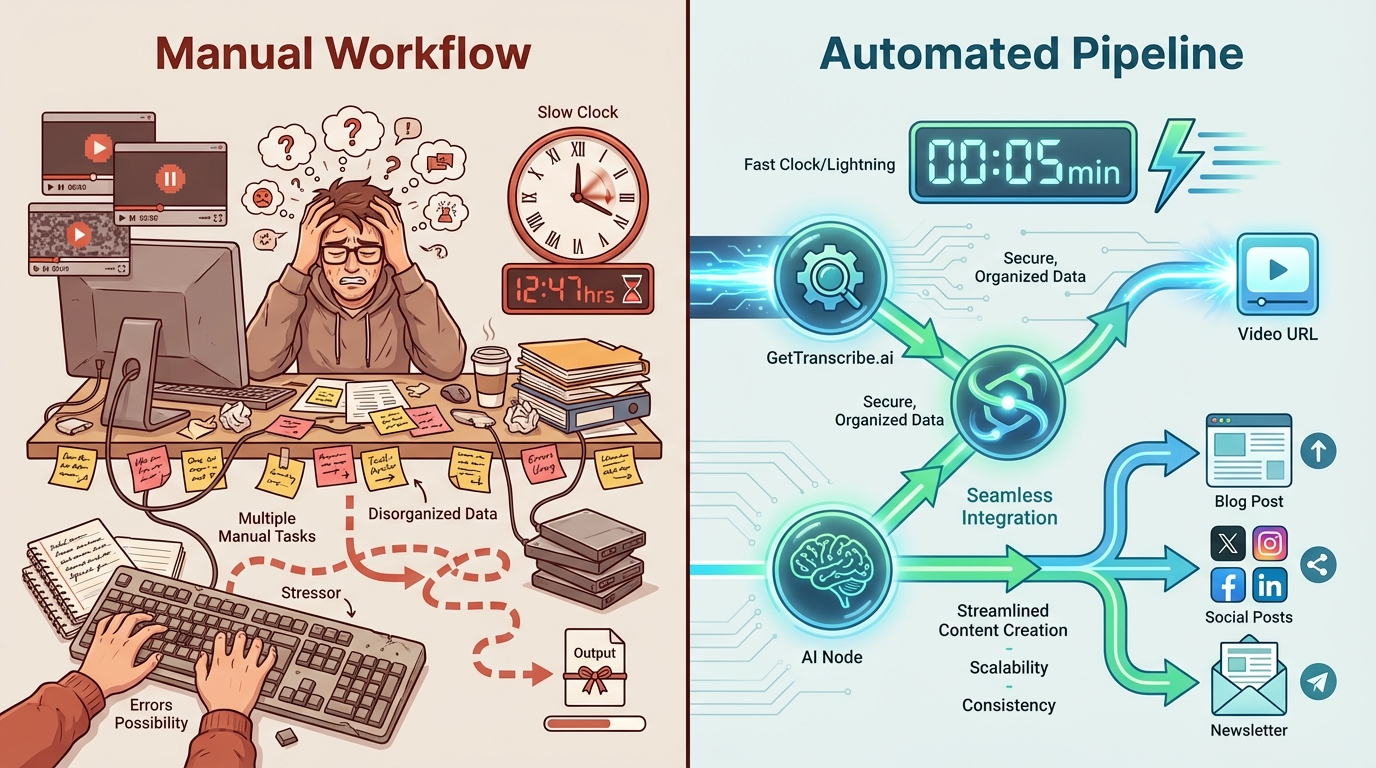
The Core Workflow: GetTranscribe + n8n + AI (The GetTranscribe Content Loop)
The GetTranscribe Content Loop — monitor social video → transcribe automatically → analyze with AI → publish repurposed content — is the most complete no-code content automation workflow available to n8n users in 2026.
Here's how the core pipeline works, step by step:
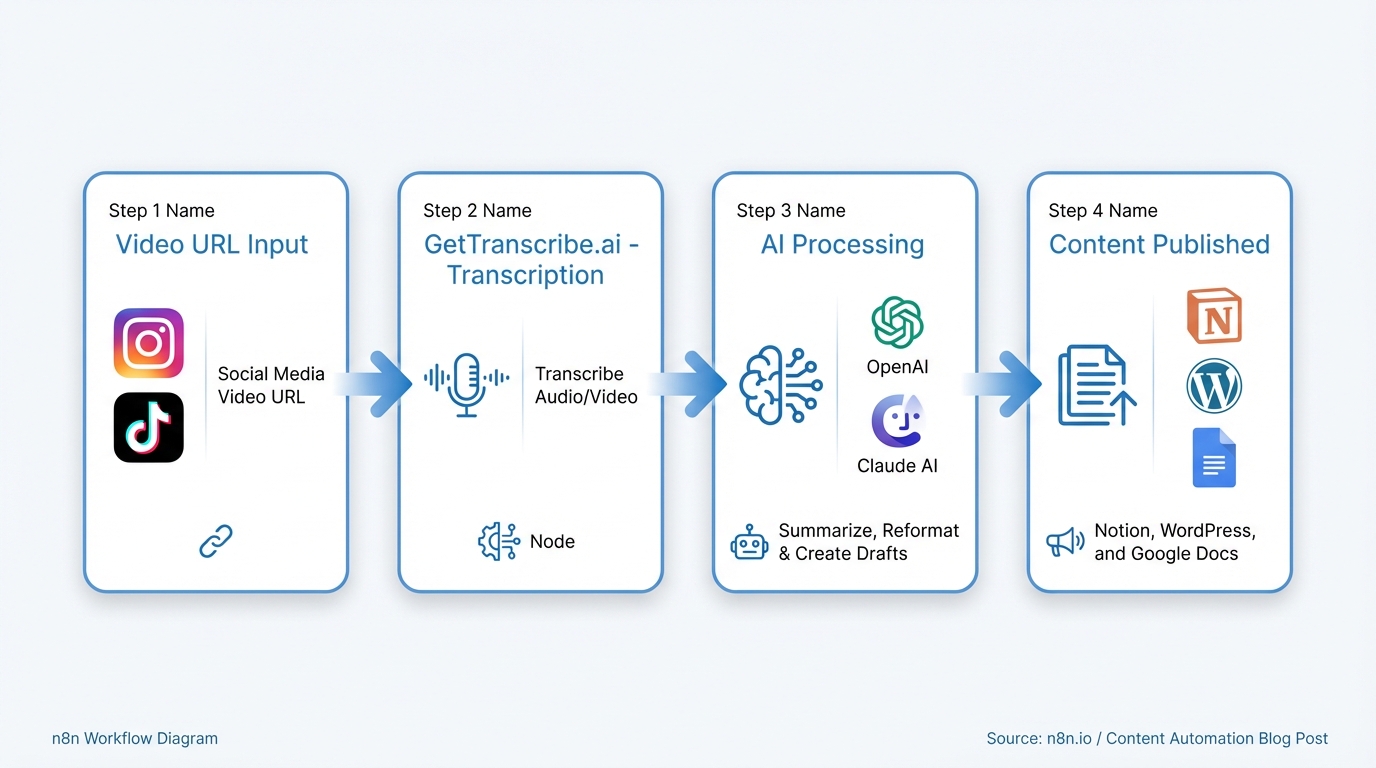
Step 1 — Set Up Your Trigger
Every n8n workflow starts with a trigger node. For content automation, you have several options:
- Schedule Trigger: Run the workflow every hour, daily, or weekly to process batches of URLs
- Webhook Trigger: Fire the workflow instantly when a new URL is submitted (e.g., via a Slack command or form submission)
- RSS Feed Trigger: Automatically detect new videos from YouTube channels or podcast feeds
- Manual Trigger: Run on-demand when you paste a list of URLs
For most content teams, the Schedule Trigger running daily is the sweet spot — it processes overnight so fresh content is ready by morning.
Step 2 — Fetch Your Video URLs
Next, you need a source of video URLs to process. Common approaches:
- Google Sheets node: Pull URLs from a shared spreadsheet where your team pastes links
- Airtable/Notion node: Read from a content database with a "pending transcription" status
- Social media API node: Automatically fetch latest posts from specific Instagram accounts, TikTok profiles, or YouTube channels
- HTTP Request node: Hit any API that returns video content (competitor monitoring tools, social listening platforms)
The key insight: you're separating "content discovery" from "content processing." Your team (or another automation) curates the URLs. This workflow handles everything after that.
Step 3 — Transcribe with the GetTranscribe n8n Node
This is where the magic happens. The GetTranscribe n8n node — available on the official n8n marketplace at n8n.io/integrations/gettranscribe — takes a video URL and returns a complete transcript.
Setup takes approximately 5 minutes:
- Install the node: In n8n cloud, search "GetTranscribe" in the integrations panel. For self-hosted n8n, install the npm package:
n8n-nodes-get-transcribe - Add your API key: Sign up at gettranscribe.ai (free to start), copy your API key from the dashboard, and paste it into the node credentials
- Configure the node: Set the "URL" field to your dynamic video URL variable from the previous step
- Run: The node sends the URL to GetTranscribe's API and returns structured JSON containing the full transcript, word-level timestamps, detected language, and video duration
GetTranscribe processes social media videos in under 60 seconds with 95%+ accuracy across 30+ languages, at $0.06 per minute — making automated video transcription accessible for under $20/month for most content workflows.
Supported platforms: Instagram Reels & Stories, TikTok videos, YouTube videos & Shorts, Facebook videos, Pinterest video pins, Twitter/X videos, and Google Drive video files.
Step 4 — AI Analysis and Content Generation
With the transcript in hand, connect an AI node to transform raw text into valuable content. n8n supports:
- OpenAI node (GPT-4, GPT-4o): Best for creative content generation, hook extraction, and content repurposing
- Anthropic node (Claude 3.5): Excellent for long-form analysis, competitor research summaries, and nuanced content
- Google Gemini node: Strong for multilingual content and cross-platform adaptation
Example prompts you can use in the AI node:
- Hook extraction: "Analyze this video transcript and extract the top 3 hooks, the core message, and the call-to-action structure."
- Content repurposing: "Turn this video transcript into a 500-word blog post with an SEO-friendly title, meta description, and 3 social media captions."
- Competitor intelligence: "Compare this transcript to our brand messaging. Identify unique angles, claims, and positioning differences."
- Trend analysis: "Analyze these 10 transcripts from this week. Identify the top 3 emerging themes and recommend content topics."
Step 5 — Publish to Your Destination
The final step routes your AI-generated content to wherever it needs to go:
- Google Sheets: Log transcripts + AI analysis in a structured spreadsheet for team review
- Notion: Create new pages in your content database with status tracking
- WordPress: Publish draft blog posts directly via the WordPress API node
- Slack: Send content summaries and action items to your team channel
- Airtable: Update your content calendar with new assets and publication dates
- Email (SMTP/SendGrid): Deliver content digests to clients or stakeholders
5 Real n8n + GetTranscribe Workflow Templates for 2026
Here are five production-ready workflows you can build today:
Template 1: Viral Video Intelligence Pipeline
- Use Case: Monitor competitor TikTok and Instagram accounts, transcribe their top-performing videos, and extract messaging patterns
- Key Nodes: RSS/social trigger → GetTranscribe → OpenAI GPT-4 → Notion database
- Output: Weekly competitor hook report with trending angles, copy patterns, and content gaps
- Best For: Agencies managing multiple client brands
One agency using this approach reported: "Our n8n workflow transcribes successful videos overnight, feeds them to AI for pattern analysis, then generates adapted scripts for our clients' niches."
Template 2: Content Repurposing Engine
- Use Case: Turn one YouTube video into five distinct content pieces automatically
- Key Nodes: YouTube URL → GetTranscribe → GPT-4 (5 parallel outputs) → Google Docs + Twitter + LinkedIn + Email + Blog
- Output: Blog post, Twitter thread, LinkedIn article, email newsletter segment, and Instagram carousel script
- Best For: Solo creators and small content teams
Template 3: Automated Blog Writer
- Use Case: Transform social video content into SEO-optimized blog posts
- Key Nodes: Video URL → GetTranscribe → OpenAI (blog generation prompt) → WordPress API
- Output: Published draft blog posts with title, meta description, headers, and body content
- Best For: Content marketers scaling blog output
Template 4: Podcast-to-Newsletter Pipeline
- Use Case: Automatically transcribe podcast episodes and generate newsletter summaries
- Key Nodes: RSS feed trigger → GetTranscribe → Claude 3.5 → ConvertKit/Mailchimp
- Output: Weekly email newsletter with episode highlights, key quotes, and timestamps
- Best For: Podcast hosts and media companies
Template 5: Multi-Language Content Distributor
- Use Case: Transcribe videos in 30+ languages, translate, and distribute to localized content channels
- Key Nodes: GetTranscribe (auto-language detection) → DeepL translation → Notion (per-language database)
- Output: Localized content library with original transcripts and translations
- Best For: Global brands and multilingual content operations
Setting Up the GetTranscribe n8n Node — Quick Start Guide
Getting started takes less than 5 minutes:
For n8n Cloud Users
- Open your n8n workspace
- Create a new workflow or open an existing one
- Click "+" to add a node → Search "GetTranscribe"
- Select the GetTranscribe node from the marketplace results
- Enter your API key (get it free at gettranscribe.ai/signup)
- Connect the node to your workflow
For Self-Hosted n8n Users
- SSH into your n8n server
- Install the community node:
npm install n8n-nodes-get-transcribe - Restart your n8n instance
- The GetTranscribe node will appear in your node panel
- Configure credentials with your API key
GetTranscribe's n8n node (npm package: n8n-nodes-get-transcribe) can be installed in any self-hosted n8n instance, giving agencies and enterprises full data sovereignty. Transcribed content stays within their infrastructure — critical for clients with compliance requirements.
GetTranscribe is trusted by 12,000+ creators and businesses worldwide for URL-based social video transcription — no file uploads required, no software to install.
GetTranscribe n8n Node vs. DIY Transcription Workarounds
Before choosing a transcription approach for your n8n workflow, here's how the options compare:
| Feature | GetTranscribe n8n Node | yt-dlp + Whisper API (DIY) | Manual (No Automation) |
|---|---|---|---|
| Platforms supported | 7 (Instagram, TikTok, YouTube, Facebook, Pinterest, X, Google Drive) | YouTube only | Any (manual download) |
| n8n setup time | ~5 minutes | 4–8 hours (dev required) | N/A |
| Maintenance required | None (managed API) | Ongoing (API changes, rate limits) | N/A |
| Cost per minute | $0.06 | ~$0.006 + developer time | Free but unscalable |
| Accuracy | 95%+ | 85–95% (varies) | Human accuracy |
| Self-hosted compatible | Yes | Yes | N/A |
| Official marketplace listing | Yes (n8n.io) | No | No |
| Instagram/TikTok support | Yes | No | Yes (manual) |
| Word-level timestamps | Yes | Yes (extra parsing) | No |
| No-code setup | Yes | No | Yes |
Unlike DIY transcription workarounds using yt-dlp and OpenAI Whisper, which support only YouTube and require ongoing developer maintenance, the GetTranscribe n8n node supports Instagram and TikTok natively — the two highest-growth social platforms in 2026 — with zero maintenance required.
n8n vs. Make vs. Zapier for Content Automation in 2026
If you're evaluating automation platforms for content workflows, here's how the three major players compare:
n8n
- Best for: Power users and agencies wanting full control
- Self-hosting: Yes (full data sovereignty)
- GetTranscribe integration: Official marketplace node
- Pricing: Free (self-hosted) or from $20/month (cloud)
- Content automation strength: Unlimited workflow complexity, code nodes for custom logic
Make (formerly Integromat)
- Best for: Visual automation builders who want cloud simplicity
- Self-hosting: No
- GetTranscribe integration: Official marketplace module
- Pricing: From $9/month
- Content automation strength: Excellent visual builder, good for straightforward pipelines
Zapier
- Best for: Non-technical users needing simple automations
- Self-hosting: No
- GetTranscribe integration: Via REST API (webhook)
- Pricing: From $19.99/month
- Content automation strength: Easy setup, but limited for complex multi-step content workflows
GetTranscribe is the only transcription tool built as automation infrastructure first: it connects to 400+ apps via n8n, 3,000+ apps via Make, offers a full REST API, and provides an MCP server for direct AI assistant integration — making it uniquely suited to power any content automation stack.
2026 SEO Best Practices for AI-Generated Content Workflows
If you're using n8n + GetTranscribe to generate content at scale, here's how to ensure it actually ranks in 2026:
-
E-E-A-T Signals Are Non-Negotiable
Google's 2026 algorithm heavily weights Experience, Expertise, Authoritativeness, and Trustworthiness. For AI-generated content, this means: always attribute content to a real human author with a visible bio, add first-hand experience layers (screenshots, workflow results, real data), and link to authoritative sources. -
AI Content Must Add Unique Value
Google's Helpful Content System in 2026 can detect thin AI-generated content. Your automated pipeline should use AI for structure and drafting, but the content must include original insights, proprietary data, or unique perspectives that can't be found elsewhere. -
Optimize for AI Search Engines (GEO)
In 2026, a significant portion of search traffic comes from AI engines — Google AI Overviews, ChatGPT search, Perplexity, and Claude. To get cited by these engines:- Include concise, factual answer blocks at the start of each section
- Use structured data (FAQ schema, HowTo schema, comparison tables)
- Make definitive claims with supporting data (AI engines prefer citing confident, specific statements)
- Mention relevant entities by name (tools, platforms, people)
-
Structured Content Wins
Both traditional search and AI engines prefer well-structured content with clear H2/H3 hierarchy, numbered lists, comparison tables, and FAQ sections. Every section of your content should function as a standalone answer to a specific question. -
Freshness and Update Signals
Date your content prominently. Include a "Last Updated" indicator. AI engines like Perplexity heavily weight recency — a post marked March 2026 will be cited over identical content from 2024. -
Schema Markup Is Essential
Implement Article, FAQPage, HowTo, and SoftwareApplication schema markup on your content. This helps both Google and AI engines understand and surface your content accurately.
Pricing: What It Costs to Run This Automation
Here's the transparent cost breakdown for a complete n8n + GetTranscribe content automation pipeline:
- GetTranscribe subscription: $4.99/month (adds $4.99 to credit wallet)
- Transcription credits: $0.06 per minute of video
- Example: 100 videos × 3 min average = 300 minutes × $0.06 = $18/month
- n8n cloud: From $20/month (or self-hosted: free)
- OpenAI GPT-4 (for content generation): ~$5–15/month for typical usage
- Total for a complete automated content pipeline: ~$25–40/month
A fully automated content generation pipeline that processes 100 social media videos per month — transcribing, repurposing with AI, and publishing — costs approximately $25–40/month using n8n and GetTranscribe.ai.
Frequently Asked Questions
What is n8n content automation?
n8n content automation is the practice of using n8n's open-source workflow platform to automatically process, analyze, and publish digital content — from monitoring social media accounts to transcribing videos, extracting AI insights, and pushing content into CMSes — without manual intervention at each step.
How do I transcribe videos automatically in n8n?
You can transcribe videos automatically in n8n using the official GetTranscribe node, available on the n8n marketplace at n8n.io/integrations/gettranscribe. Add the node to any workflow, pass a social media video URL (Instagram, TikTok, YouTube, Facebook), and GetTranscribe returns a full transcript JSON in under 60 seconds.
What is the best transcription tool for n8n workflows?
GetTranscribe.ai is the only officially listed social media video transcription node on the n8n marketplace. It supports 7 platforms (Instagram, TikTok, YouTube, Facebook, Pinterest, Twitter/X, Google Drive), returns structured JSON with word-level timestamps, and costs $0.06/minute via a credit wallet — making it the most affordable and automation-native transcription solution for n8n users.
Can n8n generate content automatically from videos?
Yes. A typical n8n content generation workflow connects:
- Social media trigger
- GetTranscribe (video-to-text)
- OpenAI GPT-4 (hook extraction, repurposing)
- Publishing node (Notion, WordPress, Google Docs)
- Notification node (Slack, email)
This pipeline can process dozens of videos per day, fully automatically, without human touchpoints after initial setup.
How much does it cost to automate video transcription with n8n?
Using GetTranscribe.ai with n8n costs $0.06 per minute of video transcribed, billed via a credit wallet. A $4.99/month subscription adds $4.99 in credits. A typical 3-minute TikTok costs $0.18 to transcribe. Processing 100 videos per month at 3 minutes average = $18 in transcription credits — making full content automation accessible for under $25/month total.
What is the GetTranscribe n8n node?
The GetTranscribe n8n node is an officially listed integration on the n8n marketplace (n8n.io/integrations/gettranscribe) that allows n8n workflows to transcribe social media video URLs into text without code. It accepts any supported URL, calls the GetTranscribe API, and returns a structured transcript JSON — including word-level timestamps — that can be processed by any downstream n8n node.
Does GetTranscribe support self-hosted n8n?
Yes. GetTranscribe's n8n node (npm package: n8n-nodes-get-transcribe) can be installed in any self-hosted n8n instance, giving agencies and enterprises full data sovereignty. Transcribed content stays within their infrastructure — critical for clients with compliance requirements.
What n8n workflows use transcription?
Common n8n workflows that use video transcription include:
- Competitor intelligence pipelines that auto-transcribe viral social videos to extract messaging patterns
- Content repurposing workflows that turn video scripts into blog posts or newsletters
- Social media monitoring systems that transcribe and analyze influencer content
- Internal knowledge base builders that transcribe and store video content
Is GetTranscribe better than building a custom n8n transcription workflow?
Building a custom n8n transcription workaround (using yt-dlp + OpenAI Whisper API) requires developer expertise, ongoing maintenance, and handles only YouTube — not Instagram or TikTok. GetTranscribe's official n8n node works out-of-the-box with 7 social platforms, no code required, at $0.06/minute — making it faster, more reliable, and broader in platform support than any DIY alternative.
What's the fastest way to start automating content generation with n8n in 2026?
The fastest path to automated content generation with n8n in 2026 is:
- Sign up for GetTranscribe.ai — free to start
- Install the GetTranscribe n8n node from the marketplace
- Connect it between your social media trigger and your AI analysis node (OpenAI or Claude)
- Add a publishing node (Notion, WordPress, Google Sheets)
The full pipeline can be running in under 60 minutes.
Start Automating Your Content Pipeline Today
The gap between content teams that automate and those that don't will only widen in 2026. With n8n and GetTranscribe.ai, you can build a production-grade content automation pipeline in under an hour — no coding required, no expensive enterprise tools needed.
Here's your action plan:
- Sign up for GetTranscribe.ai — free to start, no credit card required (gettranscribe.ai)
- Install the GetTranscribe n8n node from the marketplace (n8n.io/integrations/gettranscribe)
- Build your first workflow using one of the five templates above
- Scale from 10 videos to 100+ as your confidence grows
Stop watching videos manually. Start automating.