Connect GetTranscribe to every tool in your stack
Seven ways to add AI video transcription to your workflow — from drag-and-drop automation to a single REST API call. Pick what fits your team.

n8n
Open-source automation
Build code-friendly pipelines. Batch-transcribe hundreds of videos inside a single workflow run.

Make
No-code visual automation
Drag-and-drop scenarios that connect GetTranscribe to 1,500+ apps — no coding required.

Zapier
7,000+ app integrations
Connect GetTranscribe to any app in your stack. Build automated Zaps without writing a single line of code.
REST API
Developer-friendly
One endpoint. JSON in, transcript out. Embed transcription in any app or backend.

Chrome Extension
Browser-native
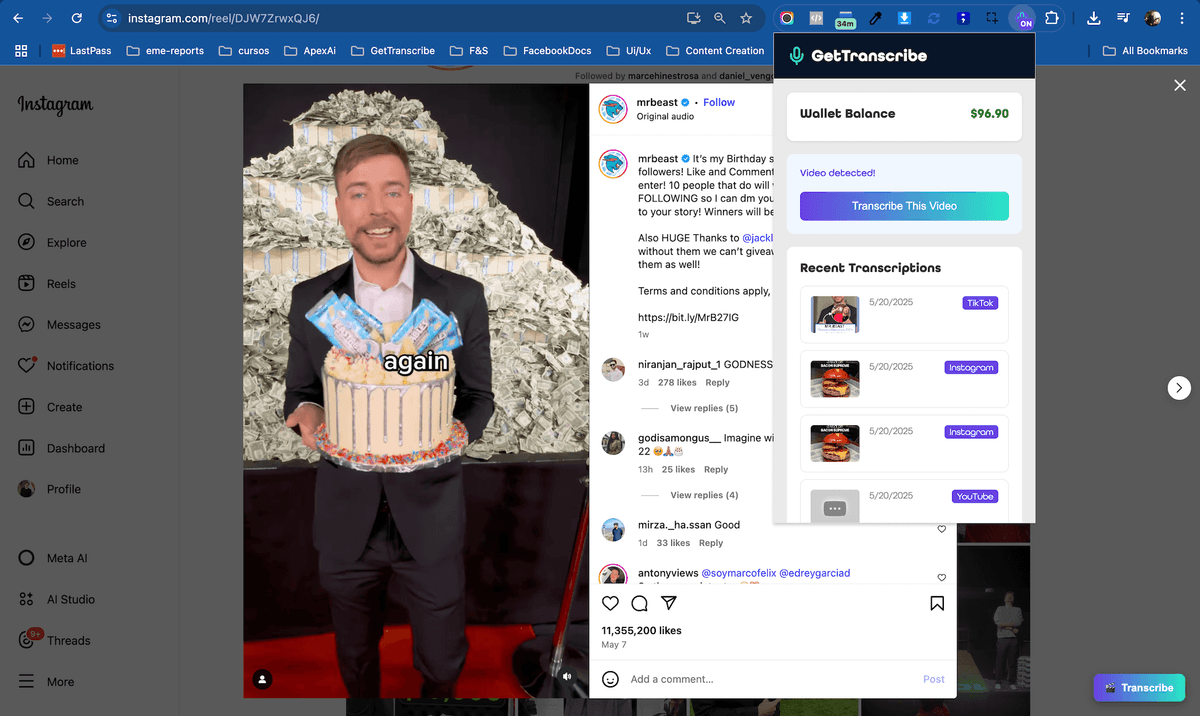
Right-click any video. Transcript appears in a side panel. No tab switching.

Claude MCP
AI assistant integration
Connect Claude once via OAuth. Then ask it to transcribe any video — web, desktop, and mobile.
/SVGs/OpenAI-white-monoblossom.svg)
ChatGPT MCP
AI assistant integration
Ask ChatGPT to transcribe a video URL. It does. The transcript stays in context.
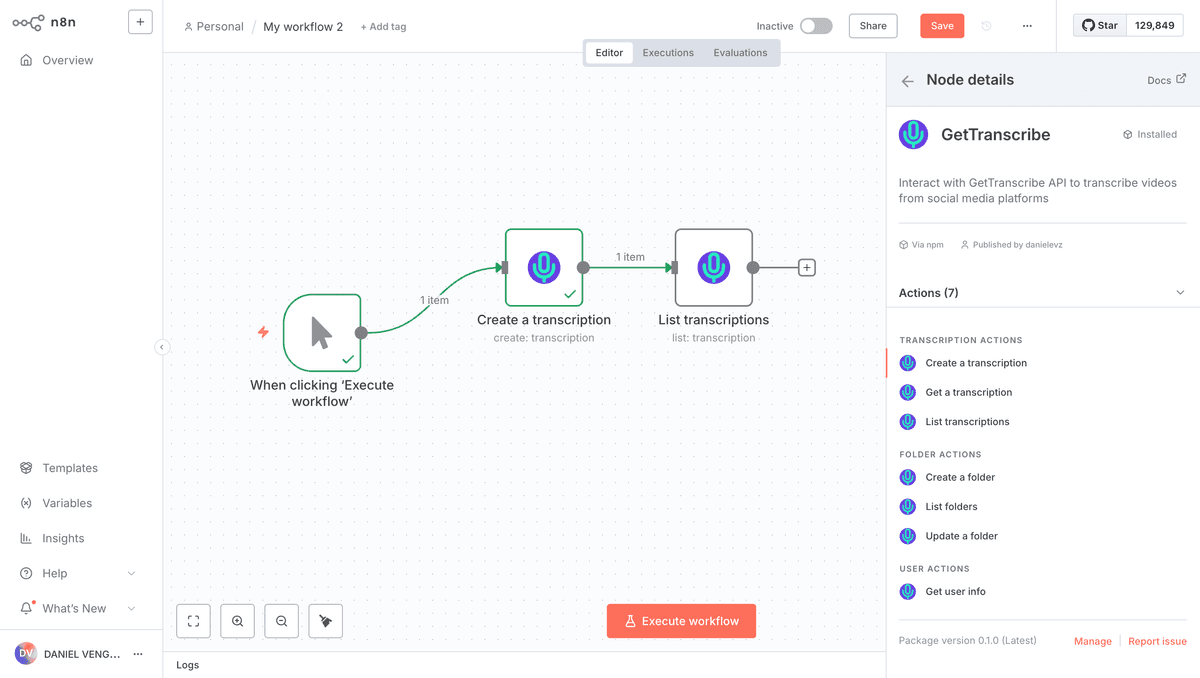
n8n — Open-Source Automation for Heavy Pipelines
n8n is self-hostable and code-friendly, which makes it the go-to choice for developers and data teams who need full control. The official GetTranscribe n8n node lets you add a transcription step to any workflow in minutes: drop it between a trigger (Webhook, Cron, RSS) and an action (Notion, Airtable, Slack, database write). Unlike generic HTTP nodes, the GetTranscribe node handles auth, error codes, and pagination for you — so you can batch-transcribe hundreds of Instagram Reels or TikTok videos inside a single workflow run without custom code.
- Supports all platforms: Instagram, TikTok, YouTube, Facebook, Pinterest, Twitter/X
- Returns full text, timestamped segments, and SRT caption data as structured JSON
- Chain with AI nodes (OpenAI, Anthropic) to summarise or classify transcripts automatically
- Self-host on your own server — data never touches a third-party SaaS layer
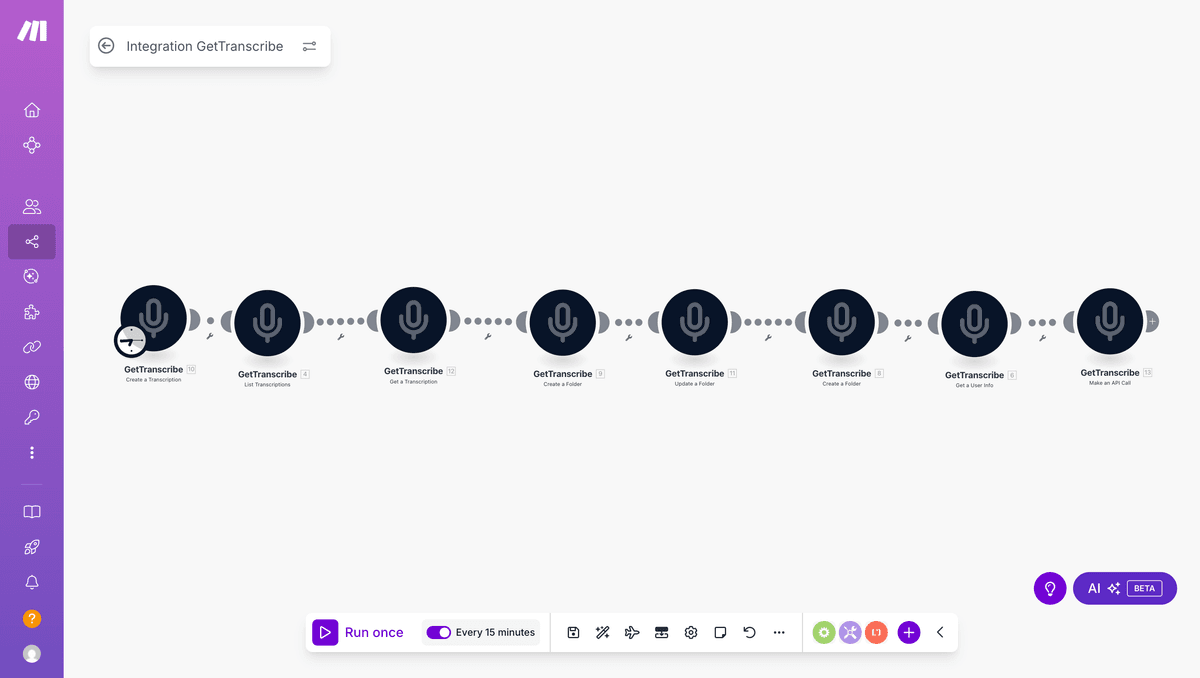
Make — Visual Scenarios, Zero Code Required
Make (formerly Integromat) is built for marketers, operations teams, and agencies who want powerful automation without touching code. The GetTranscribe Make module connects your transcription step to 1,500+ apps through a drag-and-drop canvas. A typical scenario: a new row appears in Google Sheets with a video URL → Make triggers GetTranscribe → the transcript lands in Notion, a Slack channel, or your CMS draft. You can also set up a webhook-based scenario so any tool that can send an HTTP request becomes a transcription trigger.
- Drag-and-drop scenario builder with live data preview
- Pre-built templates for content repurposing and social media monitoring
- Error handling and retry logic built in — no transcript gets lost
- Supports scheduled runs (hourly, daily) or real-time webhook triggers
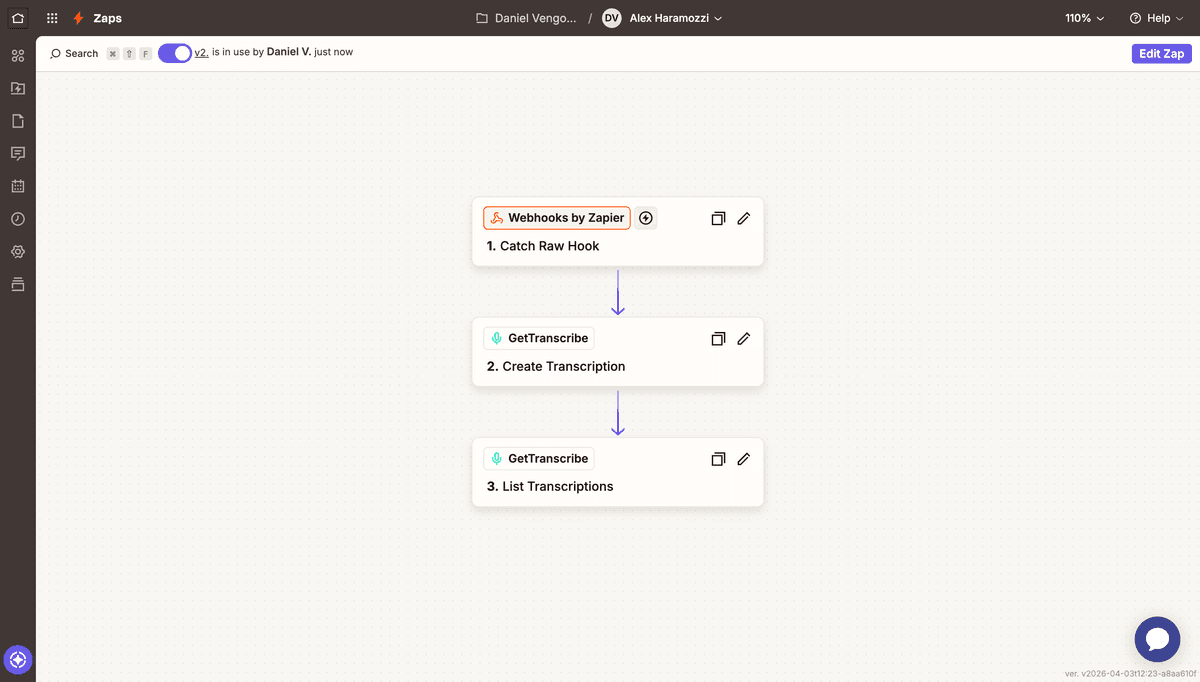
Zapier — Connect GetTranscribe via Webhooks & HTTP
Zapier is a popular automation platform used by millions of businesses. GetTranscribe connects through Zapier's Webhooks by Zapier or HTTP Request actions — there is no native Zapier app listing. A typical Zap: a new Google Sheets row, Slack message, form submission, or webhook sends a video URL to the GetTranscribe API; the transcript then flows into Notion, HubSpot, email, Airtable, or any of the 7,000+ apps Zapier supports. Multi-step Zaps let you chain actions: transcribe a video, format the text, save it to Google Docs, and send a Slack alert — all without a native directory app.
- Connect via Webhooks by Zapier or HTTP Request — no native app required
- 7,000+ trigger apps — Google Sheets, Slack, Typeform, HubSpot, Airtable, and more
- Multi-step Zaps: transcribe, format, store, and notify in one automated flow
- Filters and conditional logic let you control exactly when transcription runs
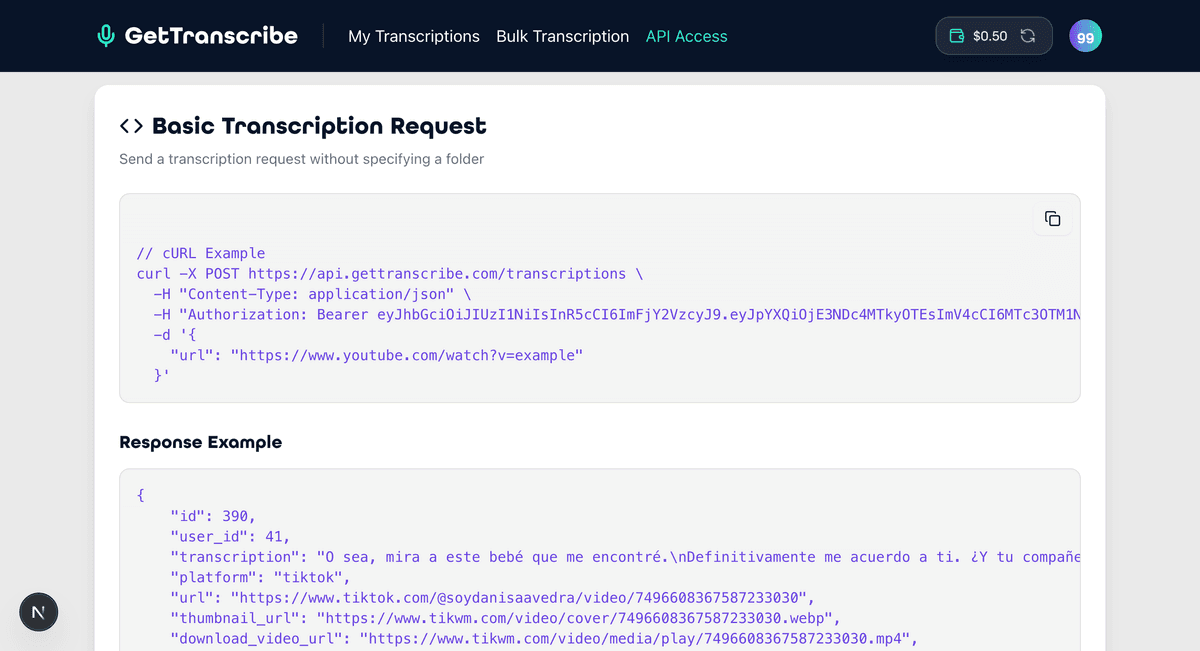
REST API — Full Programmatic Control
The GetTranscribe REST API gives developers complete control: submit a video URL, poll for completion, and receive a structured JSON response with the full transcript, word-level timestamps, detected language, and file metadata. Authentication uses bearer tokens that you generate from your account dashboard. The API is rate-limit-friendly and returns consistent error codes, making it straightforward to wrap inside any backend service, mobile app, or serverless function. Every platform supported in the web app is supported via API — Instagram, TikTok, YouTube, Facebook, Twitter/X, Pinterest, and Google Drive.
- Simple POST request to /transcriptions — one endpoint, no complex setup
- Polling endpoint returns status (pending, processing, done) plus full result
- JSON response includes text, segments[], language, duration, and cost
- Webhook support: receive the completed transcript via HTTP POST to your endpoint
Chrome Extension — Transcribe Without Leaving the Tab
The GetTranscribe Chrome Extension is for people who live in their browser. Instead of copying a URL, opening GetTranscribe, pasting, and waiting — you right-click any video on Instagram, TikTok, YouTube, or Twitter/X and click Transcribe. The transcript appears in a side panel typically about a minute later for short videos. It works on any page that embeds a supported video, including news articles and blogs that embed YouTube or Twitter videos. The extension is free to install; transcription costs the same as the web app ($0.06/min or included in your Basic or Pro subscription).
- Right-click context menu on any supported video — no URL copying needed
- Side panel shows full text and timestamped segments without navigating away
- Works on Instagram, TikTok, YouTube, Twitter/X, Facebook, and embedded players
- Syncs with your GetTranscribe account — transcripts appear in your history
Claude MCP — Transcribe Videos Inside Claude
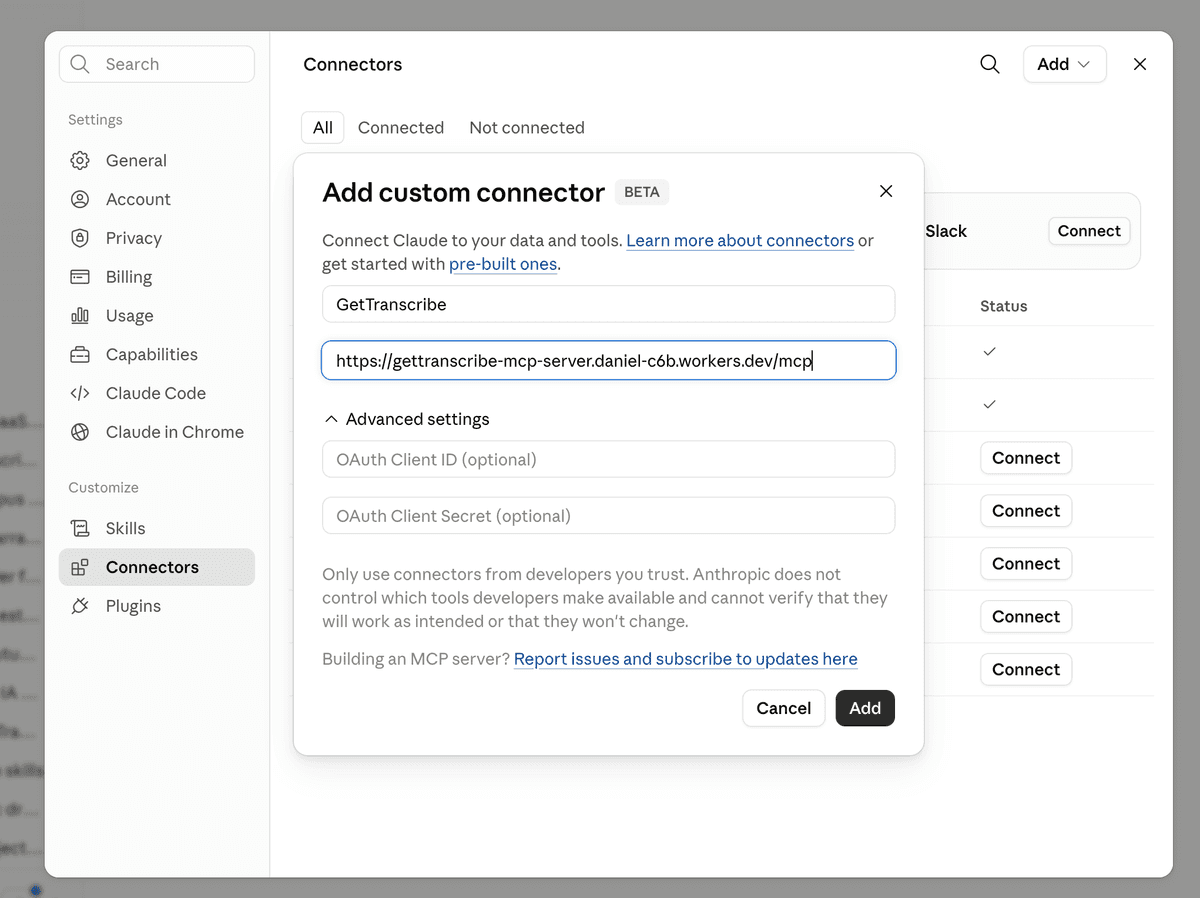
Claude connects to GetTranscribe through a remote MCP connector secured with OAuth 2.1. Add the connector once in Claude.ai — it syncs to Claude Desktop and the mobile apps automatically — then paste any Instagram, TikTok, YouTube, or Facebook URL into a conversation and ask Claude to transcribe it. Claude fetches the transcript through your GetTranscribe account and uses it as context for summaries, translations, scripts, or content analysis. No local install, no config files, no copy-paste.
- Works on Claude.ai, Claude Desktop, and Claude mobile apps — one connector for all
- Secure OAuth 2.1: enter your API key once on the consent page and you're done
- Six tools: create, get, and list transcriptions plus folder organization
- Uses your existing GetTranscribe plan and credits — no extra cost
ChatGPT MCP — Transcribe Inside Your ChatGPT Conversations
The Model Context Protocol (MCP) lets AI assistants like ChatGPT call external tools during a conversation. Create a custom app in ChatGPT's developer mode pointing to the GetTranscribe MCP server, authorize once with your API key via OAuth, and you're done: paste a video URL in your chat, ask ChatGPT to transcribe it, and the result comes back in the same thread — ready for summarization, translation, content extraction, or scriptwriting. This turns ChatGPT into a full transcription + analysis pipeline without leaving the chat interface.
- Works with ChatGPT Plus (developer mode) and any MCP-compatible client
- Secure OAuth 2.1: enter your API key once on the consent page and you're done
- Transcribe → summarise → translate in a single conversation thread
- No copy-paste loop: the AI fetches the transcript and uses it as context automatically
Model Context Protocol
Your AI assistant, now with transcription superpowers
# In your AI chat:
"Transcribe this TikTok video and summarise the main points"
→ GetTranscribe fetches + processes
→ Full transcript returned to AI context
→ AI summarises, translates, or rewrites
Frequently asked questions
Can I use GetTranscribe with n8n for free?
Yes. The n8n node is open-source and free to install from npm. You pay only for transcription time ($0.06/min) or use a Basic or Pro subscription. n8n's self-hosted version is also free.
Does the Make integration support webhooks?
Yes. You can trigger a Make scenario via webhook, pass a video URL, and GetTranscribe will process it and push the transcript to any downstream module — Google Sheets, Slack, Notion, email, or anything Make connects to.
How do I connect GetTranscribe to Zapier?
Use Zapier's Webhooks by Zapier or the built-in HTTP action to call the GetTranscribe REST API. Add your API key as a Bearer token in the Authorization header, pass the video URL from your trigger, and map the transcript output to any action step. No native Zapier app listing is required.
What does the Chrome Extension transcribe?
The Chrome Extension lets you right-click any video on Instagram, TikTok, YouTube, Facebook, or Twitter/X and transcribe it without copying URLs. The transcript opens in a side panel and syncs with your account history.
How do I connect GetTranscribe to Claude?
In Claude.ai go to Settings → Connectors → Add custom connector and paste the GetTranscribe MCP server URL. Press Connect, enter your API key once on the consent page, and Claude can transcribe videos in any conversation — on web, desktop, and mobile.
How does the ChatGPT MCP integration work?
Enable developer mode in ChatGPT Settings → Apps, create a custom app pointing to the GetTranscribe MCP server URL with OAuth, and authorize once with your API key. Then say "Transcribe this video URL" in chat and the transcript comes back in the same thread — ready for summarization, translation, or analysis.
Not sure which integration to start with?
Start with the web app for free, then add automation when you're ready. Every plan includes API access.