
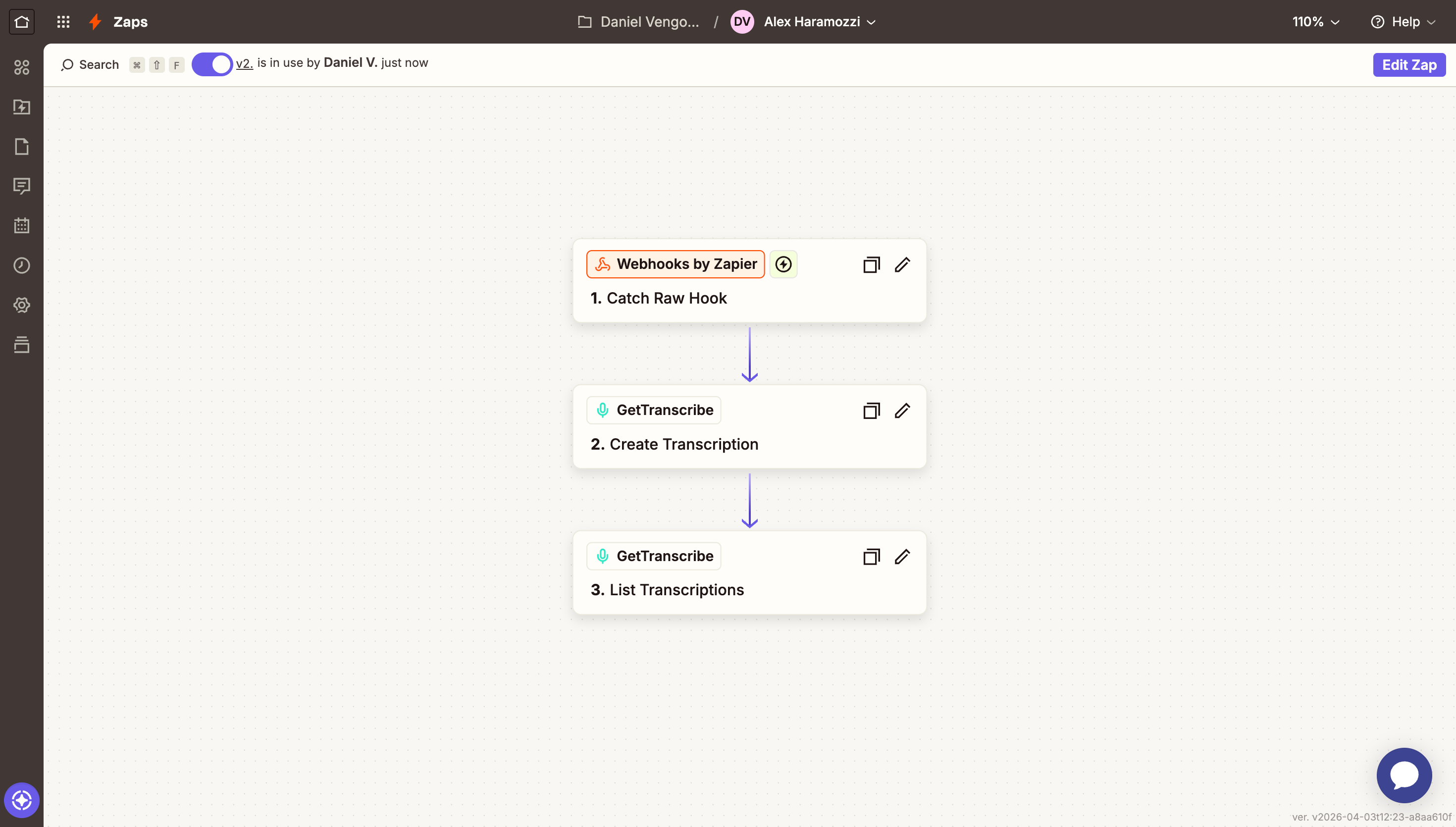
Zapier is the world leading automation platform that lets you connect GetTranscribe with thousands of apps with no coding required. Build powerful Zaps to automatically transcribe Instagram, TikTok, and YouTube videos.
Whether you are a content creator analyzing competitor videos, a marketing team monitoring brand mentions, or a business automating content workflows, this guide shows you how to build powerful transcription pipelines.
Why Use Zapier with GetTranscribe?
Connect GetTranscribe with any app or service
Do more with GetTranscribe. Connect with popular apps in just a few clicks, without any coding. Missing an app? Use generic HTTP modules to connect to any REST API.
Visualize the workflows you create
Design, build, and automate workflows with a drag-and-drop interface. Set scenarios to run instantly, on schedule, or watch them run in real time.
Create without limits
Build as if you were a developer, without writing code:
- Design workflows with as many steps as you need
- Integrate many apps in a single workflow
- Use iterators, aggregators, conditional logic, filtering, and error handling
Build faster than ever
Create, test, and edit workflows quickly. Debug in real time instead of searching through lines of code.
- Reduce time to deployment
- Identify and solve errors visually
Real-World Zaps You Can Build
Social media monitoring
Add new Instagram or TikTok video transcriptions to your CRM from videos posted by specific creators. Track competitor content automatically.
• Automatic video detection
• Transcription processing
• CRM data enrichment
Content repurposing
Create GetTranscribe transcriptions from new videos shared in Slack or Discord. Generate blog posts, captions, or newsletters from video content.
• Slack/Discord integration
• Automatic transcription
• Multi-format content creation
Example Zap workflow
"Watch a Google Sheet for new competitor video URLs. When a row is added, Zapier calls the GetTranscribe API with Webhooks or HTTP Request, then writes the transcript into Notion."
— Product workflow — Google Sheets → Zapier Webhooks/HTTP → GetTranscribe → Notion
Or design your own unique workflow — you are only limited by your imagination.
Key Features of the Zapier Integration
Connect with thousands of apps
Connect GetTranscribe with integrated apps or any API — without coding.
Flexible scheduling
Schedule your workflow to execute whenever you need.
Complex workflow design
Design workflows with as many apps and steps as you need. Add filters and conditional logic.
Real-time visual testing
Watch your workflow run in real time for visual testing.
How to Connect GetTranscribe to Zapier
Get your GetTranscribe API key
Log into your GetTranscribe dashboard, navigate to API Documentation, and create a new API key.
Get your API keyCreate Your First Zap
Connect GetTranscribe modules with your favorite apps. Select triggers and actions to define your automation.
Pro Tip: Start with a template to see examples, then customize for your needs.
Test and activate
Run a quick test to ensure everything works. Then set it to run on a schedule and relax.
Configure the GetTranscribe Action
In the action step, use HTTP/Webhooks to call the GetTranscribe API. Pass the video URL, add your API key as Bearer token, and map the transcript output.
Pro Tip: POST https://api.gettranscribe.ai/transcriptions
Test and Turn On Your Zap
Run a test end to end. Once happy, turn on your Zap and it runs automatically whenever the trigger fires.
Popular apps to connect with GetTranscribe
The real power comes from connecting GetTranscribe with other services:
Data & Spreadsheets
- • Google Sheets
- • Airtable
- • Microsoft Excel
- • Notion
Communication
- • Slack
- • Discord
- • Gmail
- • Microsoft Teams
Marketing & CRM
- • HubSpot
- • Salesforce
- • Mailchimp
- • ActiveCampaign
Ready to Automate Your Video Transcription?
Join thousands of teams saving hours every week by automating video transcription with GetTranscribe.
Free account available • $0.06 per minute of transcription
Additional resources
Documentation
Complete documentation for using GetTranscribe, including module references and examples.
Workflow templates
Browse pre-built templates to get started quickly with common transcription workflows.
GetTranscribe API Docs
Explore GetTranscribe complete API documentation for advanced integration needs.
Pricing
View pricing plans, from free forever accounts to enterprise solutions.
Frequently asked questions
Do I need coding experience?
No! These are visual no-code platforms. You can build powerful automation using a drag-and-drop interface.
How much does it cost?
The automation platform offers free tiers. You only pay GetTranscribe for transcription at $0.06 per minute of video.
Can I process videos from private accounts?
GetTranscribe can only process publicly accessible content.
What platforms can I transcribe from?
Instagram, TikTok, YouTube, Twitter, Pinterest, and Google Drive are supported.
Can I schedule workflows automatically?
Yes. Set up scheduled runs or webhooks to trigger workflows based on events from other apps.
About Zapier
Leading visual automation platforms help individuals, teams, and enterprises create powerful custom solutions that scale their businesses faster than ever.