
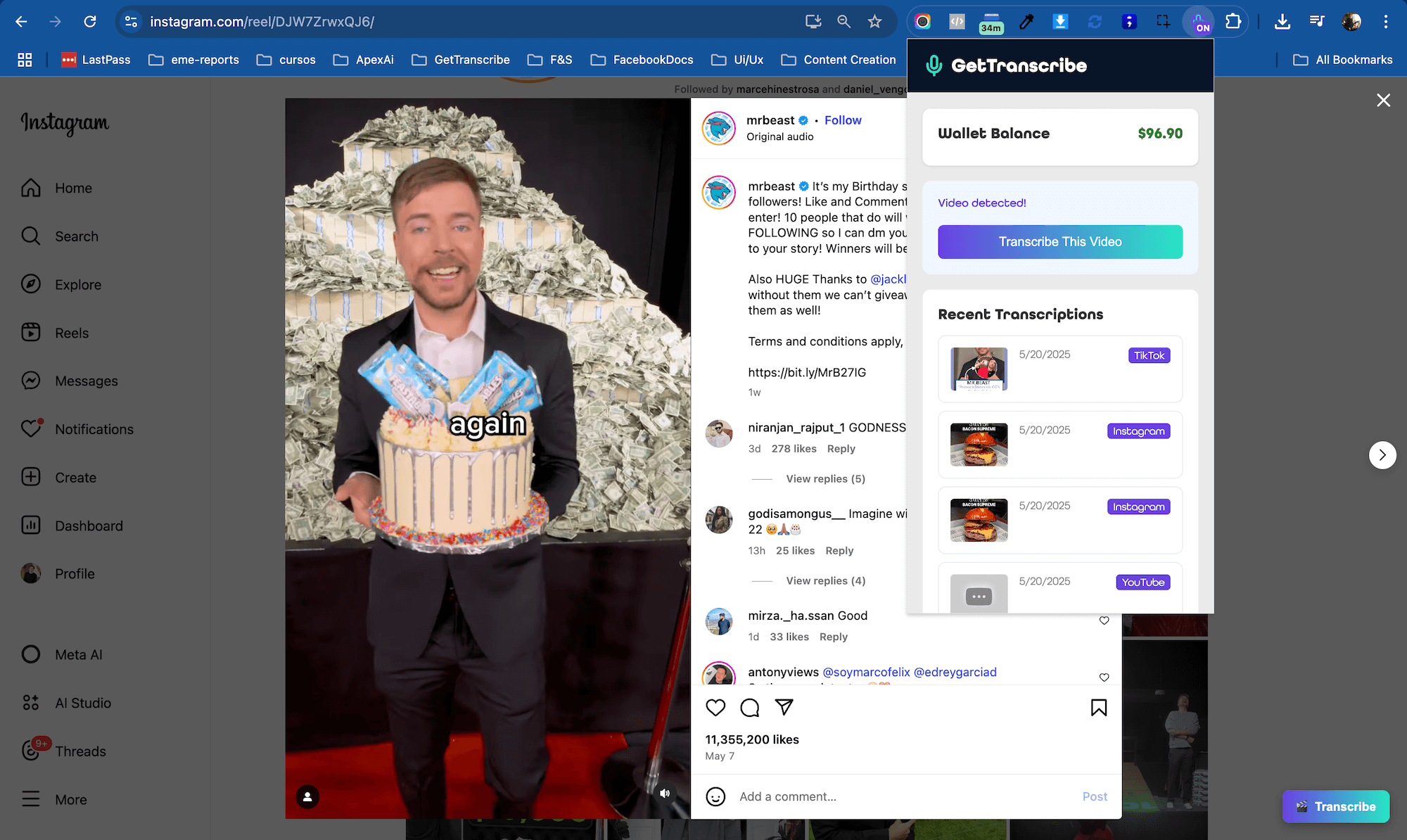
The perfect tool for anyone who needs to quickly convert video content into editable text. Transcribe videos from Instagram and TikTok directly in your browser with just one click.
Whether you are a content creator analyzing competitor videos, a marketing team monitoring brand mentions, or a business automating content workflows, this guide shows you how to build powerful transcription pipelines.
Why Use the GetTranscribe Chrome Extension?
Instant Access
With a single click, convert any video from Instagram and TikTok into a clean, timestamped transcript. No need to copy URLs or switch tabs.
Save Time
Forget manually transcribing or searching for scripts. GetTranscribe extracts spoken text so you can edit and reuse it — short videos typically finish in about a minute.
Seamless Integration
Works right within your browser on Instagram and TikTok pages. Click the extension icon and you are good to go.
Who Benefits from the Chrome Extension?
Content Creators
Quickly analyze viral videos, extract engaging hooks, and understand what makes content successful.
- • Study competitor strategies
- • Extract quotes and key moments
- • Create written content from videos
Marketers & Researchers
Monitor brand mentions, analyze campaign performance, and research trending topics without manual transcription.
- • Brand monitoring on social media
- • Competitor analysis
- • Trend research and insights
How creators use the extension
Open Instagram or TikTok in Chrome, click the GetTranscribe icon on a public video, and save the transcript to a folder in your dashboard. Copy text, download SRT, or send the result into your next content step — without leaving the browser tab.
Product workflow — Chrome extension → transcript → export
How to Get Started
Install the Extension
Visit the Chrome Web Store and click Add to Chrome. Free to install and takes seconds.
Install from Chrome Web StoreCreate Your Account
Click the extension icon and sign in with your GetTranscribe account.
Create free accountStart Transcribing
Navigate to any Instagram or TikTok video. Click the extension icon — transcript ready in about a minute.
Pro Tip: Pin the extension to your Chrome toolbar for faster access.
Extension Features
One-Click Transcription
Transcribe any Instagram or TikTok video with a single click from your browser toolbar.
Timestamped Output
Get clean, accurate transcripts with timestamps for easy reference.
Real-Time Processing
Most videos are transcribed in under 60 seconds.
Wallet Balance Display
See your account balance directly in the extension.
Recent Transcriptions History
Quick access to recent transcriptions with thumbnails and platform badges.
Lightweight & Fast
Only 67KB in size. Won't slow down your browser.
Supported Platforms
Reels, Stories, Posts, and IGTV videos
TikTok
All public TikTok videos and content
More Coming
YouTube and other platforms in development
Start Transcribing Smarter Today
Join thousands of teams saving hours every week by automating video transcription with GetTranscribe.
Free to install • $0.06 per minute • 5.0★ rating on Chrome Web Store
Frequently asked questions
Do I need coding experience?
No! These are visual no-code platforms. You can build powerful automation using a drag-and-drop interface.
How much does it cost?
The automation platform offers free tiers. You only pay GetTranscribe for transcription at $0.06 per minute of video.
Can I process videos from private accounts?
GetTranscribe can only process publicly accessible content.
What platforms can I transcribe from?
Instagram, TikTok, YouTube, Twitter, Pinterest, and Google Drive are supported.
Can I schedule workflows automatically?
Yes. Set up scheduled runs or webhooks to trigger workflows based on events from other apps.