GetTranscribe vs CapCut: Which Is Better for Video Transcription? (2026)
GetTranscribe is a dedicated transcription tool; CapCut is a video editor with a captions feature. Learn which one wins for URL-paste transcription, content research, and automation workflows in 2026.
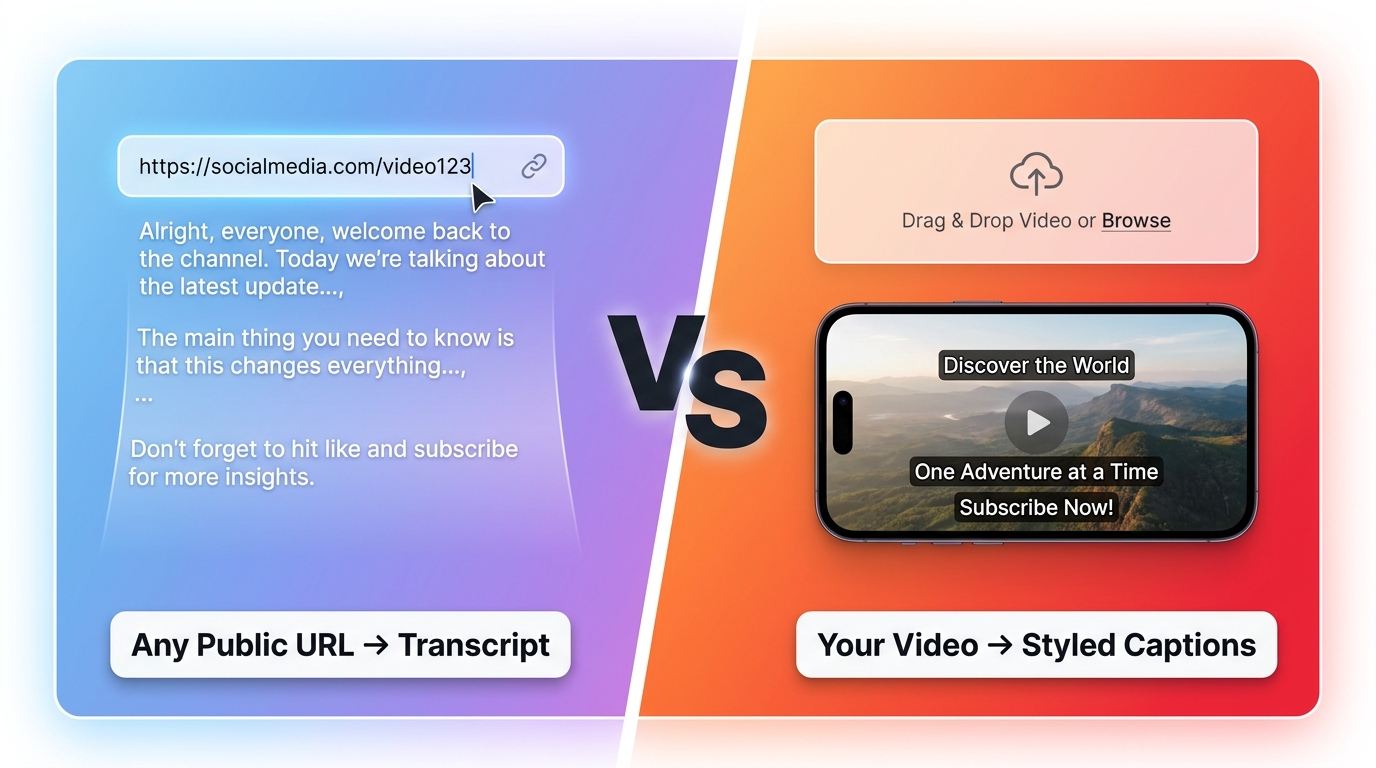
TL;DR: GetTranscribe and CapCut solve fundamentally different problems. GetTranscribe is a dedicated AI transcription tool — paste any public URL from TikTok, Instagram, YouTube, or 4 other platforms and get a full text transcript in under 60 seconds. CapCut is a video editor built by ByteDance that includes an Auto Captions feature for your own downloaded video files. If you need to transcribe any social media video (including competitors' content) and get a clean, exportable transcript, GetTranscribe wins outright. If you need to edit your own videos with styled on-screen captions, CapCut is the right tool. They are not direct competitors — one is a transcription-first tool, the other is an editor-first tool with captions as a secondary feature.
GetTranscribe vs CapCut: What Each Tool Actually Does
Before comparing features side by side, it's essential to understand what each product is — because most comparison articles miss the key distinction entirely.
GetTranscribe is a transcription-first tool. You paste a URL. You get text. That's the entire workflow. It was built from the ground up to convert social media video URLs into accurate, exportable transcripts as fast as possible. There is no video editor, no timeline, no export-to-social feature. It is purpose-built to answer one question: "What is being said in this video?"
CapCut is a video editor first. It was created by ByteDance (the company behind TikTok) to help creators edit, trim, add effects, and publish short-form videos. Its Auto Captions feature — which many people call "CapCut transcription" — generates styled captions that overlay your video as part of the editing process. The output is a captioned video, not a standalone text transcript.
This distinction matters enormously for your workflow:
- If your goal is to extract the text from a video so you can repurpose it, research it, or feed it into an automation — you need GetTranscribe.
- If your goal is to add styled captions to a video you've already filmed and want to publish on TikTok or Instagram — CapCut does this well.
The critical limitation of CapCut: It requires you to import a video file into its editor. You cannot paste a TikTok URL, an Instagram Reel link, or a YouTube URL into CapCut and get a transcript. You must have the video file downloaded to your device first. This means CapCut can only transcribe videos you already own and have on your device.
GetTranscribe has no such limitation. Any public video URL from Instagram, TikTok, YouTube, Facebook, Pinterest, X (Twitter), or Google Drive works instantly — including videos published by competitors, influencers, or brands you don't own.
Feature Comparison Table
| Feature | GetTranscribe | CapCut |
|---|---|---|
| Primary product | AI Transcription Tool | Video Editor |
| Input method | ✅ URL paste (no download needed) | ❌ File upload required |
| Supported platforms | Instagram, TikTok, YouTube, Facebook, Pinterest, X, Google Drive | Only videos you own/download |
| Transcribe competitor videos | ✅ Yes — any public URL | ❌ No — only your own files |
| Output type | Full text transcript (TXT, SRT, VTT, DOCX) | Styled caption overlay on video |
| Free tier | ✅ Free to start, no credit card | ⚠️ 10 auto captions/day (capped) |
| Transcription accuracy | 95%+ (clear English audio) | ~70–80% (struggles with fast speech, accents, music) |
| Speed | Under 60 seconds | Varies by file size and upload |
| Languages | 30+ auto-detected | Select supported languages |
| Export formats | TXT, SRT, VTT, DOCX, word-level timestamps | SRT/TXT export + captioned video |
| API / integrations | REST API, n8n, Make, Zapier, ChatGPT MCP, Claude MCP, Chrome Extension | ❌ None |
| Bulk transcription | ✅ Yes | ❌ No |
| AI chat on transcripts | ✅ Yes | ❌ No |
| Security | SOC 2 Type II, GDPR, 256-bit AES | Standard app security |
| Best for | Creators, marketers, researchers, developers needing transcripts | Video editors adding captions to their own content |
When to Use GetTranscribe (and When CapCut Falls Short)
There are five key scenarios where GetTranscribe is the clear winner — and where CapCut simply cannot help you at all.
Use Case 1: Transcribing Competitor TikToks and Reels
This is the single most important use case that differentiates GetTranscribe from CapCut: CapCut cannot transcribe a competitor's video. Full stop. Because CapCut requires a file upload, you'd need to download a competitor's TikTok or Instagram Reel, which raises copyright and terms-of-service concerns — and even then, CapCut's Auto Captions is designed to output a styled video, not a clean transcript.
With GetTranscribe, you paste the competitor's public TikTok URL and receive the full transcript in under 60 seconds. This is invaluable for competitor video analysis and transcription: understanding the hooks they use, the scripts they've tested, the messaging angles that are getting millions of views.
GetTranscribe wins. CapCut cannot do this.
Use Case 2: Researching Viral Video Hooks and Scripts
Content creators and marketers need to understand why certain videos go viral. That means analyzing the scripts and hooks at scale. If you want to pull the transcripts from 20 viral TikToks in a niche, GetTranscribe's bulk transcription feature handles this in minutes — paste a list of URLs and get all 20 transcripts simultaneously.
CapCut offers no equivalent workflow. You'd need to download each video, import it one by one, and generate captions individually — and still not get a clean exportable transcript.
Use Case 3: Content Repurposing Pipeline
One of the most popular content workflows in 2026 is turning short-form video into long-form written content. Repurposing TikTok videos into blog posts requires a full, clean text transcript — not a caption overlay. GetTranscribe exports in TXT, SRT, VTT, and DOCX formats with word-level timestamps, making it easy to drop your transcript into a blog post, newsletter, or content brief.
CapCut's output is a captioned video — not a clean document you can edit or publish as text.
Use Case 4: Multi-Platform Bulk Transcription
GetTranscribe supports 7 platforms natively: Instagram, TikTok, YouTube, Facebook, Pinterest, X (Twitter), and Google Drive. You can transcribe TikTok videos to text free just as easily as you can transcribe Instagram Reels — the workflow is identical: paste URL, get transcript.
CapCut is designed primarily for the TikTok/Instagram short-form video editing ecosystem. It has no native YouTube or Facebook URL transcription capability.
Use Case 5: API and Automation Workflows
GetTranscribe is built for automation. It offers a REST API, a native n8n node, integrations with Make and Zapier, and MCP (Model Context Protocol) connectors for ChatGPT and Claude. This means you can build fully automated transcription pipelines — from social media monitoring to transcript archiving to AI analysis — without any manual steps.
CapCut has zero API or automation integrations. It is a standalone desktop and mobile editor. There is no way to automate CapCut transcription workflows programmatically.
When to Use CapCut (and Why GetTranscribe Isn't a Video Editor)
To be fair: CapCut is excellent at what it's designed to do. And GetTranscribe is not a replacement for CapCut in video editing contexts.
Use CapCut when:
- You are editing your own filmed videos for TikTok or Instagram
- You want styled, animated captions burned into your video (not just a text file)
- You need video trimming, speed adjustments, transitions, background music, and effects
- Your goal is to produce a finished, publishable short-form video
CapCut's Auto Captions produce visually styled text overlays that match the aesthetic of popular TikTok videos. For creators whose primary workflow is producing videos (not analyzing them), CapCut's captions feature is genuinely useful — even if it's limited to 10 caption generations per day on the free tier and requires a CapCut Pro subscription for unlimited use.
GetTranscribe does not edit video. It does not add overlays, apply effects, or export edited clips. If you need those features, use a video editor like CapCut, Descript, or CapCut alternatives. GetTranscribe's job is to extract the words from a video and give them back to you as clean, accurate text.
The workflow many creators use is actually both tools together: record and edit your video in CapCut, then paste the published URL into GetTranscribe to get a clean transcript for your blog, newsletter, or social media caption.
Pricing Comparison
Understanding pricing requires understanding that these are different product categories — you're not comparing apples to apples.
GetTranscribe Pricing
| Plan | Price | Minutes/mo | Best For |
|---|---|---|---|
| Free | $0 | Limited | Try it out |
| Basic | $7.99/mo | 50 min | Light users |
| Starter | $9.99/mo | 150 min | Regular creators |
| Pro | $29.99/mo | 500 min | Power users & agencies |
| Pay-as-you-go | From $10 | 66–1,666 min | Occasional use |
GetTranscribe is free to start with no credit card required. The Basic plan at $7.99/month is one of the lowest entry points among dedicated transcription tools. PAYG credit packs start at $10 and give you 66 minutes of transcription — ideal if you only need occasional use. See full pricing details.
CapCut Pricing
CapCut's core video editor is free. However, Auto Captions on the free tier is capped at 10 generations per day. For unlimited Auto Captions and advanced features, you need CapCut Pro, which runs approximately $7.99–$9.99/month (pricing varies by region and plan).
Key pricing insight: If you're paying for CapCut Pro just to get unlimited auto captions, you're paying for a full video editing suite to access a single feature that wasn't designed to produce standalone transcripts. GetTranscribe's Basic plan at $7.99/month gives you a purpose-built transcription tool with far more capability for the same price.
The Verdict: GetTranscribe vs CapCut for Transcription
Here's the decision matrix in plain terms:
| Your Goal | Best Tool |
|---|---|
| Transcribe any public TikTok, Instagram, or YouTube URL | GetTranscribe |
| Transcribe a competitor's video | GetTranscribe |
| Get a clean text transcript (TXT, DOCX, SRT) | GetTranscribe |
| Research viral video scripts at scale | GetTranscribe |
| Build an automated transcription pipeline | GetTranscribe |
| Add styled captions to your own edited video | CapCut |
| Edit, trim, and add effects to short-form video | CapCut |
| Produce TikTok-ready captioned content | CapCut |
GetTranscribe is the right choice if:
- You need to transcribe any public video — not just your own
- You need a clean, exportable text file (not a captioned video)
- You're building content pipelines, doing competitor research, or repurposing video at scale
- You need API access, n8n, Make, Zapier, or AI assistant integrations
CapCut is the right choice if:
- You are producing and editing your own short-form videos
- Your primary need is styled, animated captions burned into video
- You don't need standalone transcripts — you need a finished, publishable video
The bottom line: CapCut's Auto Captions is not a transcription tool — it's a captioning feature inside a video editor. If you actually need transcripts — for research, repurposing, automation, or analysis — GetTranscribe is purpose-built for exactly that. Try GetTranscribe free →
Frequently Asked Questions
Can CapCut transcribe any video URL?
No. CapCut cannot transcribe a video URL. It requires you to import a video file directly into the CapCut editor on your device. You cannot paste a TikTok link, Instagram Reel URL, or YouTube URL into CapCut and receive a transcript. If you need to transcribe a video from a URL, GetTranscribe is designed specifically for this workflow.
Does CapCut have a free transcription tool?
CapCut has a free Auto Captions feature within its video editor, but it is limited to 10 auto caption generations per day on the free tier. It is not a standalone transcription tool — it generates caption overlays for videos you import into the CapCut editor. For unlimited captions, CapCut Pro is required.
What's the difference between CapCut captions and GetTranscribe transcripts?
CapCut Auto Captions are styled text overlays added to your video — the output is a captioned video file. GetTranscribe produces a full text transcript that you can export as TXT, SRT, VTT, or DOCX, edit, search, and use in any workflow. GetTranscribe also provides word-level timestamps and an AI chat feature for interacting with your transcript content.
Can I transcribe a competitor's TikTok with CapCut?
No. Because CapCut requires a local file upload, you cannot use it to transcribe a competitor's TikTok or any video you don't own. GetTranscribe can transcribe any public TikTok video — just paste the URL and get the full transcript in under 60 seconds. This makes it ideal for competitive research and content analysis.
Is GetTranscribe better than CapCut for content creators?
It depends on what you mean by "better." For creating and editing videos with styled captions, CapCut is the right tool. For extracting transcripts from social media videos, researching competitor content, repurposing video to text, and building content automation workflows, GetTranscribe is significantly more capable. Most professional content creators use both: CapCut for editing and GetTranscribe for transcription and research. Learn more in our guide to the best transcription tools for content creators.
Does GetTranscribe work with Instagram, YouTube, and TikTok?
Yes. GetTranscribe supports 7 platforms natively: Instagram, TikTok, YouTube, Facebook, Pinterest, X (Twitter), and Google Drive. You can transcribe TikTok videos to text and transcribe Instagram Reels using the same paste-URL workflow. No downloads, no file management — just paste and transcribe.
What integrations does GetTranscribe have vs CapCut?
GetTranscribe offers a REST API, a native n8n node, Make integration, Zapier integration, and MCP connectors for both ChatGPT and Claude. It also has a Chrome Extension for one-click transcription. CapCut has no API or automation integrations — it is a standalone editor with no programmatic access.
How accurate is CapCut auto transcription?
CapCut's Auto Captions are reported at roughly 70–80% accuracy for standard speech. Accuracy drops significantly with fast speech, heavy accents, background music, or overlapping voices. GetTranscribe achieves 95%+ accuracy for clear English audio, with support for 30+ languages and auto-detection. For critical transcription work — research, content repurposing, automation — the accuracy gap matters significantly.
Is there a free way to transcribe TikTok videos without CapCut?
Yes. GetTranscribe offers a free tier with no credit card required. Simply paste any public TikTok URL at GetTranscribe.ai and get your transcript instantly. For a full walkthrough, see our guide on how to transcribe a TikTok video to text free. GetTranscribe is also one of the best TikTok to text converter tools available in 2026.
Can GetTranscribe replace CapCut?
No — and that's intentional. GetTranscribe is not a video editor. It does not trim, add effects, apply music, or export finished videos. If you need those capabilities, CapCut remains the best free option for short-form video editing. GetTranscribe replaces CapCut only in the context of extracting text from video — a use case for which GetTranscribe is far more capable and flexible.
Ready to start transcribing any social media video in seconds? Try GetTranscribe free — no credit card required →